
Last updated on
Nov 6, 2026

Get the free Insulation Certificate
We are not affiliated with any brand or entity on this form

Fill out
Complete the form online in a simple drag-and-drop editor.

eSign
Add your legally binding signature or send the form for signing.

Share
Share the form via a link, letting anyone fill it out from any device.

Export
Download, print, email, or move the form to your cloud storage.
Why pdfFiller is the best tool for your documents and forms


End-to-end document management
From editing and signing to collaboration and tracking, pdfFiller has everything you need to get your documents done quickly and efficiently.
Accessible from anywhere
pdfFiller is fully cloud-based. This means you can edit, sign, and share documents from anywhere using your computer, smartphone, or tablet.
Secure and compliant
pdfFiller lets you securely manage documents following global laws like ESIGN, CCPA, and GDPR. It's also HIPAA and SOC 2 compliant.
What is Insulation Certificate
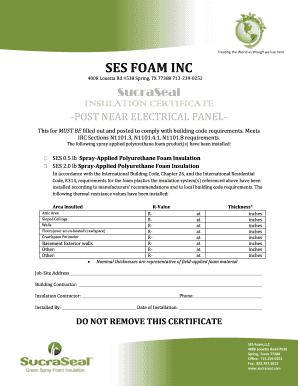
The Insulation Certificate is a real estate form used by contractors to certify spray polyurethane foam insulation installation in accordance with building codes.
pdfFiller scores top ratings on review platforms




I like that I can fill in forms and return to them later to complete them.
Very helpful for many documents. Thank you.
Really like using this site for all my IRS form and lease agreements.
Very practical and intuitive software. Works well with forms.
PDFfiller have made life very easy for me to do my Taxes, Printing, Faxing, PDFfiller made it so easy to send out very important paperwork. Everything is on this want site. Thank You.
I am just learning, so far it is very useful. i like it.
Who needs Insulation Certificate?
Explore how professionals across industries use pdfFiller.

Insulation Certificate is needed by:
-
Building Contractors
-
Insulation Contractors
-
Property Managers
-
Homeowners
-
Real Estate Agents
-
Construction Inspectors
Comprehensive Guide to Insulation Certificate
Understanding the Insulation Certificate
The Insulation Certificate serves a vital role in real estate and construction by certifying compliance with insulation standards, notably for spray polyurethane foam insulation. This document ensures adherence to building codes, fostering safety in structures.
Being compliant with applicable building codes is essential for property owners and contractors, as it can prevent potential risks associated with inadequate insulation practices. Furthermore, the Insulation Certificate acts as a safeguard for investments, affirming that insulation installation meets required standards.
Purpose and Benefits of the Insulation Certificate
The necessity of the Insulation Certificate is paramount for both property owners and contractors, as it validates adherence to the International Building Code and IRC sections. It plays a significant part in safeguarding property values, ensuring that the insulation installed is effective and compliant.
By maintaining compliance, property owners can avoid costly rework and ensure the longevity of their investments. The Insulation Certificate also promotes responsible construction practices, reinforcing the importance of proper installation.
Key Features of the Insulation Certificate
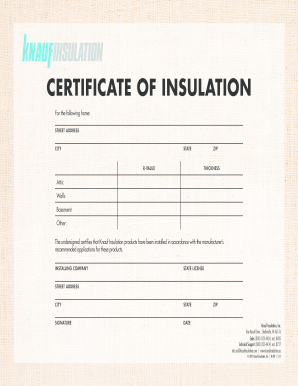
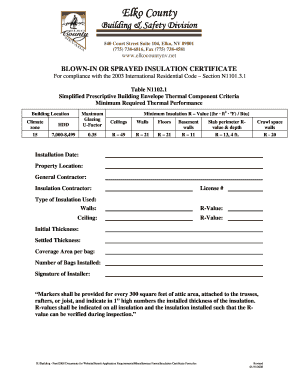
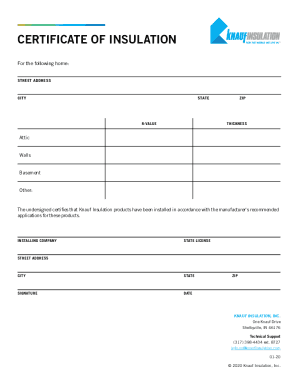
The Insulation Certificate includes several essential components designed to ensure thorough documentation of insulation practices. Among its features are fillable fields that capture critical information such as jobsite address, date of installation, and contractor details.
Additionally, the document employs checkboxes and tables for specifying insulation products alongside their thermal resistance, ensuring detailed compliance tracking. Each feature is designed to streamline the documentation process, making it more efficient for users.
Who Needs the Insulation Certificate?
Understanding who needs the Insulation Certificate is crucial for compliance. Contractors, builders, and property owners are responsible for obtaining and accurately filling out this form. It is particularly mandatory in scenarios involving new constructions and major renovations.
Awareness of the requirements set by local authorities ensures that all parties understand when the Insulation Certificate is needed, preventing compliance issues in the future.
How to Fill Out the Insulation Certificate Online
Filling out the Insulation Certificate online is a straightforward process when using the pdfFiller platform. Begin by accessing pdfFiller and selecting the Insulation Certificate template to get started.
-
Log into your pdfFiller account or create a new one.
-
Search for the Insulation Certificate template within the platform.
-
Carefully fill out each field, ensuring that you enter accurate information.
-
Review your entries to confirm all details are correctly filled.
Following these steps ensures you complete the form with precision and ease, facilitating a smooth submission process.
Common Errors to Avoid When Filling Out the Insulation Certificate
Many users encounter pitfalls when filling out the Insulation Certificate. Common errors include leaving fields incomplete or entering inaccurate contractor information. These mistakes can lead to delays or rejections in processing the form.
To avoid complications, always double-check your entries for accuracy and completeness before submission. Ensuring that all necessary information is correct helps facilitate a smooth approval process.
After Submission: What to Expect
Once you submit the Insulation Certificate, various actions will occur. Users will receive confirmation of their submission and have access to tracking options through pdfFiller.
After submission, expect to go through an inspection process where compliance checks will be performed. Timelines for feedback may vary based on local regulations and workloads, so it's essential to stay informed during this period.
Using pdfFiller for Your Insulation Certificate Needs
Utilizing pdfFiller for completing the Insulation Certificate streamlines the entire process. The platform offers features such as eSigning and secure document management, enhancing the efficiency of form handling.
With strong security protocols in place, users can trust that sensitive information remains protected, ensuring peace of mind throughout the form-filling and submission process.
Final Thoughts on the Importance of the Insulation Certificate
Completing and maintaining the Insulation Certificate is crucial for compliance and safeguarding property investments. By prioritizing this documentation, users contribute to overall safety and adherence to building regulations.
Employing pdfFiller ensures that managing insulation documentation is easy, allowing users to focus on their projects without the hassle of complicated paperwork.
How to fill out the Insulation Certificate
-
1.Access the Insulation Certificate form by visiting pdfFiller and searching for 'Insulation Certificate'.
-
2.Open the form by selecting it from the search results. It will be displayed in the pdfFiller editor.
-
3.Familiarize yourself with the interface. Locate the blank fields where you need to input your information, such as 'Jobsite Address' and 'Date of Installation'.
-
4.Gather the necessary information before you begin. Ensure you have the details of the insulation products, thermal resistance values, and contractor information.
-
5.Start filling in the fields. Click on the text boxes to enter information about the address, installation date, and contractor details.
-
6.Use checkboxes and tables in the form to specify insulation details accurately. Ensure all required sections are complete.
-
7.Once you've entered all the information, review the form for accuracy. Make sure all details are correct to avoid processing delays.
-
8.After finalizing the form, save your work by clicking on the 'Save' button. You can also export it as a PDF or other formats if needed.
-
9.Submit the form by following the submission instructions provided on the pdfFiller platform. Ensure all signatures, if necessary, are obtained before submission.

Who needs to fill out the Insulation Certificate?
The Insulation Certificate should be filled out by building and insulation contractors to document insulation installation that meets building code requirements.
Are there deadlines for submitting the Insulation Certificate?
Deadlines can vary based on local building regulations. Check with your local authority to determine the submission timeline for the Insulation Certificate.
What information is required to complete the form?
You will need the jobsite address, date of installation, insulation products used, thermal resistance values, contractor information, and details of the installation.
Where do I submit the completed Insulation Certificate?
The completed Insulation Certificate should be posted near the electrical panel at the job site as per regulation and may also need to be submitted to local building authorities.
What are common mistakes to avoid when filling out this form?
Ensure all fields are filled out completely and accurately, double-check addresses and dates, and avoid leaving any required sections blank.
Is notarization required for the Insulation Certificate?
No, the Insulation Certificate does not require notarization as per the current guideline.
How long does it take to process the Insulation Certificate?
Processing times can vary based on the local authority’s regulations. It’s advisable to check directly with them for specific times.
Related Forms





Related Catalogs
Get the latest insights from our blog



If you believe that this page should be taken down, please follow our DMCA take down process
here
.
This form may include fields for payment information. Data entered in these fields is not covered by PCI DSS compliance.